FormulaEngineer — a .NET library to create, read, recalculate and style Excel (.xlsx) files in C# without Excel or COM interop
Not just calculation. Presentation.
FormulaEngineer writes the workbook a person will actually open — fonts, fills, number formats, merged banners, conditional formatting, tables and charts — in the same streaming pass that computes the numbers.
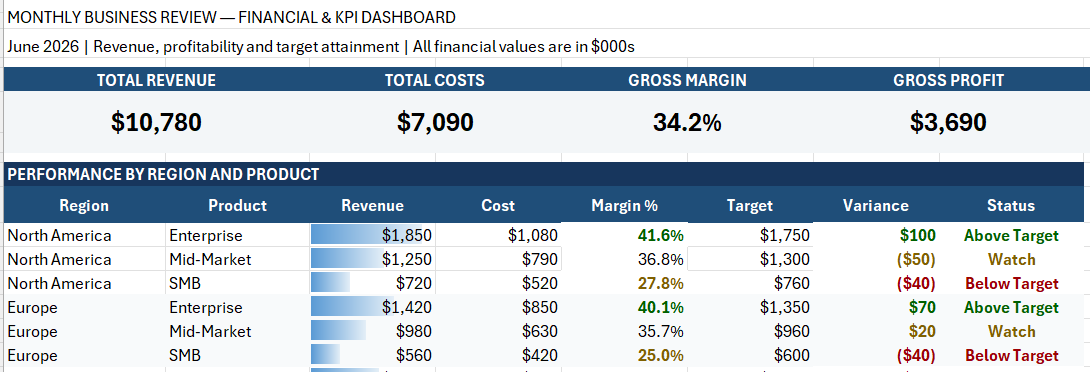
29 live formulas 18 format rules 13.7 KB file
Open existing workbooks, create new ones, and evaluate
formulas instead of relying on cached .xlsx values.
Handles ranges, references, coercion, errors, and circular references.
Designed for ASP.NET, APIs, Linux, containers, and background jobs.
Fonts, fills, borders, number formats, alignment, merged cells, and column layout.
Data bars, colour scales, icon sets, and formula rules that Excel evaluates when the file opens.
Real Excel tables, charts, sparklines, images, and threaded comments — all opt-in.

Pricing rules, financial models, forecasts, and operational logic live in Excel formulas — often as a chain of dependent cells nobody wants to rewrite in C#.
FormulaEngineer resolves those dependencies and recalculates the result in pure managed .NET. No Excel install, no COM interop, no template file.
Every read parses the formula, resolves its references, evaluates the values, and formats the result — rather than trusting whatever Excel happened to save last time the file was opened.
Ranges, coercion, Excel-style errors, and circular reference detection are all handled, across 460+ functions.
ExcelStyledWriter applies fonts, fills,
borders, number formats, alignment, merged banners,
column widths, and row heights as the rows stream out.
Only the current row is held in memory, so the same
code path handles a ten-row summary and a
multi-million-row export.
Data bars, colour scales, icon sets, and formula-driven rules are written as real conditional formatting, so Excel re-evaluates them when the numbers change.
Excel tables, charts, sparklines, images, shapes, and threaded comments are all available, each behind its own opt-in flag so unused features cost nothing.
Machine hash calculator
Generate the unique hash needed for your FormulaEngineer license.
How to find your hardware identifiers
-
1
Open PowerShell as your normal user (no admin needed).
-
2
CPU ID
Get-CimInstance Win32_Processor | Select-Object -ExpandProperty ProcessorId -
3
Motherboard serial
Get-CimInstance Win32_BaseBoard | Select-Object -ExpandProperty SerialNumber -
4
System drive volume serial
cmd /c vol C:
-
1
Open a terminal as your normal user. Some commands may need
sudo. -
2
CPU ID (machine ID)
cat /etc/machine-id -
3
Motherboard serial
sudo cat /sys/class/dmi/id/board_serial -
4
Root volume UUID
findmnt -n -o UUID /
-
1
Open Terminal (Applications → Utilities → Terminal).
-
2
Platform UUID (enter in the CPU ID field)
ioreg -rd1 -c IOPlatformExpertDevice | awk -F'"' '/IOPlatformUUID/ { print $(NF-1); }' -
3
Motherboard serial — macOS doesn't expose one. Leave that field blank.
-
4
Volume UUID
diskutil info / | awk -F': *' '/Volume UUID/ { print $2; }'